Test atPlatform apps in one or more physical devices.

Apps require plenty of power for testing in an emulator. On top of that, running docker and perhaps a few background chrome tabs could be devastating for a low-end machine. To avoid this, simply open your vs code (Any lightweight editor will work) editor and develop it much quicker than before, with your physical device.
Configuring DNS masquerading Server
You have to first go to your virtual environment folder. If you follow the exact instruction from our getting started page until the advanced section your virtual environment folder will be in the User home folder. Such as in windows : C:\Users\ {Username}\ve . Now open up the “docker-compose.yaml” file in your favorite code editor. Uncomment the lines to enable your DNS masquerading server which can serve DNS and point the DNS address vip.ve.atsign.zone to the hosting PC/MAC/Linux machine.
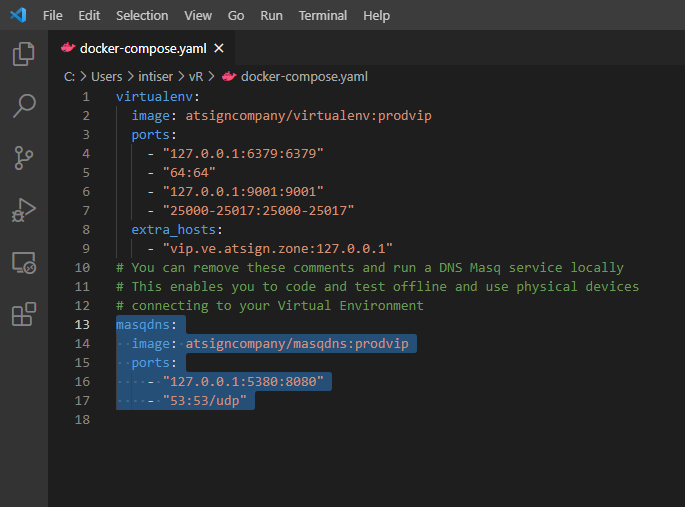
Then to starts the Dns msq container run ‘docker-compose up -d’ in the terminal.
To find the IP address you need to run ifconfig/ipconfig based on which operating system you are running. Select the Ipv4 address starting with 192 and copy it. Then go to your local DNS Masq server: http://localhost:5380/
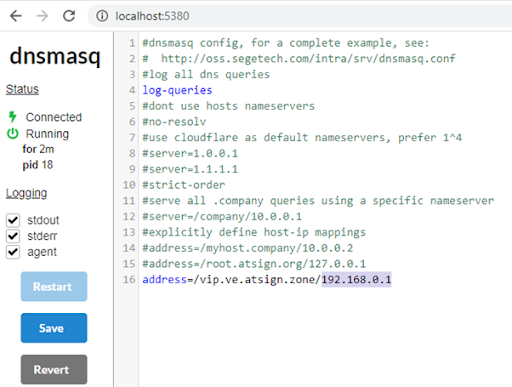
edit the address=/vip.ve. atsign.zone line to paste your IP address. Then save it.
Configuring Physical device
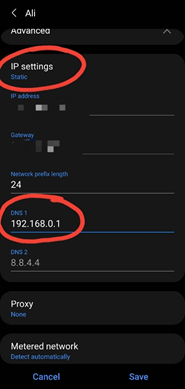
To configure the physical device, you have to go to the Wi-Fi setting. In android you have to change the IP settings from DHCP to static.
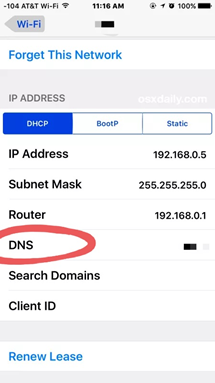
Then paste your IP address and save it. You can add as many devices as you want with this setup.
Enjoy developing in atProtocol !
Comments
Join the discussionNo comments yet. Be the first to comment.